
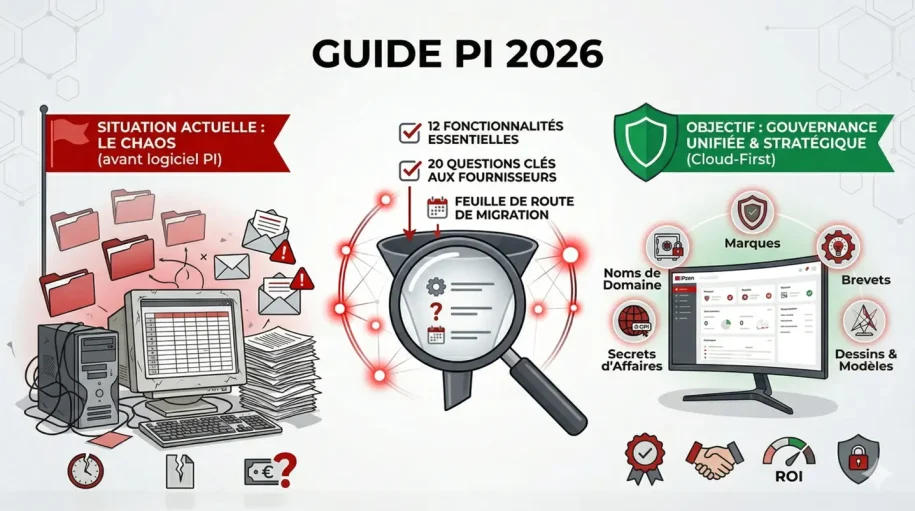
The global IP management software market reached €9.5 billion in 2025 and continues its rapid expansion as organizations recognize that scattered spreadsheets, email chains, and manual filing systems are no longer viable. Whether you manage a handful of trademarks or thousands of patents across multiple jurisdictions, the right IP management solution can mean the difference between strategic growth and costly compliance failures.
Selecting an IP management software (IPMS) is not a trivial purchase. It’s a decision that ripples across your organization, affecting your legal team’s productivity, your CFO’s budget allocation, your executives’ risk exposure, and your company’s ability to enforce and leverage its intellectual property assets. A poor choice can lead to missed renewal deadlines, duplicate filings, vendor lock-in, and years of operational friction.
This buyer’s guide provides IP managers, general counsel, and CIOs in international companies with objective, concrete criteria to evaluate and compare solutions. We’ve moved beyond vendor marketing claims to focus on what actually matters in 2026.
Sommaire
- 1 1. The IP management software landscape in 2026
- 2 2. Cloud vs. On-Premise : the debate is settled
- 3 3. The 12 must-have features for your IPMS evaluation
- 4 4. The 20 questions to ask vendors during product demos
- 5 5. Red flags and traps to avoid
- 6 6. From selection to go-live – the migration roadmap
- 7 7. Frequently asked questions
- 8 Conclusion: making your decision
- 9 Related resources
- 10 External references & sources
1. The IP management software landscape in 2026
Market context and drivers
The explosion in global IP portfolios, driven by international expansion, digital transformation, and increased enforcement needs has made manual IP management impossible for organizations managing more than 50 assets. Even mid-sized companies with global ambitions need systemic solutions.
Key market drivers in 2026:
- Regulatory complexity: USPTO PTAB proceedings, EU trade mark regulations, and emerging IP jurisdictions require real-time compliance tracking
- Portfolio scale: The average multinational company now manages IP across 40+ jurisdictions
- Budget pressure: CFOs demand ROI visibility and cost optimization, not just “nice-to-have” tools
- Integration needs: IP data must flow seamlessly between legal, finance, R&D, and marketing systems
- Remote teams: Distributed legal teams require cloud-based collaboration and anywhere access
Who needs an IPMS?
Different organization types have different requirements:
Large enterprises with extensive IP portfolios : typically managing 500+ trademarks, patents, designs, and domains across multiple jurisdictions, need enterprise-grade solutions with sophisticated workflow automation, advanced reporting, and integration capabilities. Learn more about enterprise IP management
IP law firms : serving multiple clients require multi-client environments, granular billing integration, and white-label capabilities. Explore law firm solutions
In-house IP departments : managing corporate portfolios need efficient docketing, deadline tracking, and portfolio optimization features. See internal department solutions
Innovative SMEs : building trademarks and technology portfolios need cost-effective solutions that scale as they grow. Check out SME solutions
Tech startups : protecting early innovations need lightweight, affordable platforms for domain and trademark management. Discover startup solutions
2. Cloud vs. On-Premise : the debate is settled
For new IPMS selections in 2026, the on-premise vs. cloud question is largely resolved. Here’s why cloud wins:
Cloud advantages
| Criterion | Cloud | On-Premise |
| Initial capital | Low (subscription) | High (servers, licenses) |
| Scalability | Unlimited growth, instant expansion | Hardware constraints, planned upgrades |
| Security updates | Automatic, vendor-managed | Your responsibility, often delayed |
| Disaster recovery | Built-in redundancy, automatic backups | Requires separate investment |
| Remote access | Global accessibility, work from anywhere | VPN required, firewall complexity |
| Compliance (SOC 2, ISO 27001) | Industry-standard certifications | Variable, audits required |
| Integration capability | API-first architecture | Often limited, requires custom development |
| Vendor updates | Continuous improvements, new features | Licensing cycles, upgrade costs |
The reality: Every major IPMS vendor has moved to cloud-first models. On-premise deployments are offered only as legacy options, often at premium costs with extended support commitments. Unless your organization has specific regulatory requirements (rare for IP management), cloud solutions offer superior security, flexibility, and total cost of ownership.
One caveat: Verify that your cloud provider offers data residency options if you operate in jurisdictions with strict data localization requirements (e.g., China, Russia).
3. The 12 must-have features for your IPMS evaluation
Not all IP management features are created equal. These 12 capabilities form the backbone of effective IP portfolio management. Use this table as your evaluation matrix.
The 12 essential features
| Feature | Why it matters | What to look for | ipzen.com capability |
| IP docketing | Central repository for all IP assets, dates, and status | Automated deadline calculation, multi-jurisdiction support, audit trails | Native docketing engine with real-time calculations |
| Trademark portfolio management | Track registrations, renewals, and status across jurisdictions | Bulk operations, class-based organization, renewal workflows | Dedicated trademark module with automated renewal alerts |
| Domain name management | Monitor domain expirations, WHOIS data, registrar coordination | Bulk domain tracking, expiration alerts, registrar integration | Domain expiration monitoring with alert escalation |
| Agenda & deadline tracking | Never miss a critical deadline again | Customizable alerts, calendar views, delegation workflows | Real-time deadline engine with multi-channel notifications |
| Document & file management | Organize contracts, communications, decision files in one location | OCR capability, version control, access controls | Centralized document repository with metadata search |
| Integrated invoicing | Track and manage vendor costs, partner invoices | Budget tracking, cost allocation by matter/client, vendor management | Built-in invoicing with cost center allocation |
| Automation | Reduce manual data entry and routine tasks | Workflow automation, rule-based triggers, API integrations | Smart automation engine reducing manual tasks by 60-70% |
| Prior art search integration | Streamline search capabilities before filing | Access to major search databases, result caching, collaboration tools | Integrated search tools with results management |
| Domain monitoring | Detect squatters, cybersquatters, and infringing domains | Real-time monitoring, alert thresholds, report generation | Continuous domain surveillance with alert escalation |
| Cybersecurity & trademark protection | Protect your trademark across digital channels | Marketplace monitoring, takedown management, counterfeiting detection | Integrated trademark protection workflow |
| Advanced reporting & analytics | Demonstrate IP value to executives and boards | Custom report builder, dashboard creation, data export capabilities | 100+ pre-built reports plus custom dashboard builder |
| Enterprise integration | Connect with your existing tech stack | API-first architecture, webhooks, pre-built connectors (ERP, CRM, HCM) | REST APIs with 50+ pre-built integrations |
Beyond the basics: advanced capabilities
Once you’ve confirmed these 12 essentials, evaluate these advanced features based on your specific needs:
- Collaborative workflows: Comment threads, task assignments, approval chains
- Matter-based organization: Group assets by product line, market, or legal matter
- Jurisdiction-specific rules: Automatic compliance with EUIPO, USPTO, and other regulator requirements
- Multi-language support: Interface and reporting in your team’s native languages
- Single sign-on (SSO): Integration with Okta, Azure AD, or other identity providers
- Advanced search and filtering: Complex queries, saved searches, bulk operations
- Expense allocation: Track costs by department, client, product line, or business unit
- Intake workflows: Structured forms for new IP asset submissions from inventors, trademark teams, and product managers
4. The 20 questions to ask vendors during product demos
Use this checklist during vendor demonstrations. The quality of answers – and vendor willingness to answer directly – reveals a lot about their platform maturity.
Data & architecture questions
- What is your database architecture? (Look for answers mentioning PostgreSQL, MongoDB, or enterprise databases – avoid vague responses)
- How do you handle multi-jurisdiction IP rules? (They should have specific, not generic, answers about USPTO, EUIPO, WIPO requirements)
- Can we export our data in standard formats (CSV, JSON, XML)? (Essential for migration flexibility)
- What is your data backup and disaster recovery SLA? (Acceptable answer: 99.99% uptime, automatic daily backups, recovery point objective under 1 hour)
- Do you offer data residency options? (Important for GDPR, CCPA, or localization requirements)
Functionality questions
- How does the system calculate renewal deadlines across different jurisdictions? (They should demonstrate real, complex examples – not just simple math)
- Can we create custom matter codes or classification schemes? (Flexibility matters; avoid lock-in to vendor taxonomies)
- How many users can the system support simultaneously? (Answer should be “unlimited” for modern cloud platforms)
- Do you support bulk operations? (Renewing 500 trademarks one-by-one is unacceptable; bulk workflows are non-negotiable)
- How is reporting customized? (Manual report building vs. drag-and-drop dashboard builder vs. BI tool integration – all valid, but understand their approach)
Integration questions
- What pre-built integrations do you offer? (Ask specifically about Salesforce, NetSuite, SAP, Microsoft Dynamics, or whatever systems you use)
- What is your API rate limit and availability? (Look for generous limits that support real-time syncing)
- Can we use webhooks for event-driven integrations? (Modern integration requirement)
- Do you support single sign-on with our identity provider? (SAML 2.0 or OpenID Connect compliance)
Security & compliance questions
- What certifications do you maintain? (ISO 27001, SOC 2 Type II, and industry-specific certifications matter; ask for current audit reports)
- How do you handle encryption? (In transit: TLS 1.2+; at rest: AES-256 minimum)
- What is your patch and vulnerability management process? (Should have a documented, regular schedule)
- Can you provide a detailed security overview for our legal/compliance team? (Willingness to engage with your security team is a green flag)
- How do you handle subprocessor changes? (GDPR compliance: you should be notified of new third-party processors)
Vendor & support questions
- What is your customer support model and response SLA? (24/7 support? Business hours? Ticket response time? Escalation procedures?)
Pro tip: Ask vendors to demo their system handling a real scenario from your portfolio – a trademark renewal with multiple jurisdiction-specific rules, or a complex domain portfolio. Canned demos hide operational limitations.
5. Red flags and traps to avoid
Even well-intentioned IPMS evaluations can result in poor selections. Watch for these red flags during your selection process.
Vendor lock-in red flags
The trap: Proprietary data formats, export restrictions, or architectural decisions that make switching prohibitively expensive. Once you’re live with an IPMS, switching costs are enormous.
Red flags to watch for:
- Vendor refuses to commit to data export capabilities in standard formats
- Custom development required for basic integrations with your existing systems
- Long minimum commitments (5+ years) without break clauses
- Pricing model heavily weighted toward professional services and implementation
- No published API documentation or roadmap
Protection strategy: Require contractual language guaranteeing data portability, establish a data export process during implementation, and negotiate realistic contract terms (3 years maximum initial commitment).
Hidden cost traps
The reality: The vendor’s quoted price is rarely the final price. Common hidden costs include:
- Per-user licensing creeping beyond initial estimates as your team grows
- Implementation and training budgets that exceed 50% of software costs
- Data migration services charged at premium consulting rates
- Premium integrations that should be standard (Salesforce, NetSuite)
- Annual support costs that increase 10-15% per year
- Feature requests that require custom development at €200+/hour
Protection strategy: Require detailed SOWs breaking down implementation costs, negotiate unlimited user licenses for your team, establish fixed annual support fees, and clarify what’s included vs. what’s optional.
Data migration nightmares
The common scenario: You have 2,000 trademarks in spreadsheets, a legacy docketing system from 2008, and email chains with critical decisions scattered across years of archives. Migration is not a weekend project.
Real risks:
- Data loss during conversion (duplicate detection failures, corrupted legacy formats)
- Timeline slips (migration takes 3x longer than estimated, delaying go-live)
- Quality issues (dirty data in the new system requiring months of correction)
- Staff frustration (complex workflows during parallel running of old and new systems)
- Cost overruns (migration labor becomes the largest project expense)
Protection strategy: Budget 3-6 months for data migration, establish a dedicated data governance team, require the vendor to provide detailed migration playbooks, and plan for significant parallel running of old and new systems. Data quality is more important than speed.
Feature bloat vs. actual usability
The trap: Selecting based on feature checklists rather than actual user workflow efficiency.
Some vendors tout 200+ features, but your team uses 20. A simpler system with excellent UX for your core workflows beats a complex system with marginal support for edge cases.
Questions to ask:
- How many clicks to complete your most common task (e.g., renew a trademark)?
- Can new users become productive in 2 hours or 2 weeks?
- Are workflows customizable without custom development?
6. From selection to go-live – the migration roadmap
Choosing the right software is only the first step. Successful implementation requires a structured roadmap.
Phase 1: pre-selection (weeks 1-4)
- Form evaluation committee: General counsel, IP manager, finance, IT/security
- Document current state: Catalog all data sources (spreadsheets, legacy systems, email archives)
- Define success criteria: Specific KPIs for deadline accuracy, team productivity, cost visibility
- Issue RFP to shortlisted vendors (minimum 3)
Phase 2: vendor evaluation (weeks 5-8)
- Technical deep-dive demos with your actual data patterns
- Reference customer calls (ask for similar-sized companies in your industry)
- Security and compliance review with your IT/Security teams
- Proof of concept (optional, but valuable for complex migrations)
Phase 3: procurement (weeks 9-12)
- Negotiate contracts with focus on data portability and realistic timelines
- Establish clear implementation SLAs and penalty clauses for delays
- Secure sign-off from finance, legal, and executive stakeholders
- Create formal steering committee for implementation oversight
Phase 4: implementation planning (weeks 13-16)
- Detailed data audit: Identify data quality issues before migration
- Workflow mapping: Document your current processes end-to-end
- Build data migration playbooks with vendor
- Establish parallel running timeline (typically 4-8 weeks)
- Create training curriculum tailored to different user roles
Phase 5: data migration (weeks 17-24)
- Execute bulk data imports with automated quality checks
- Manual data cleanup for problem records
- Parallel running: Old system remains in use while new system is validated
- Iterative testing with actual user workflows
Phase 6: user training & go-live (weeks 25-28)
- Role-specific training for different user groups
- “Super user” development: Train power users who support others
- Cutover preparation: Detailed go-live checklist
- Post-go-live support: Vendor and internal resources on standby
Phase 7: optimization (weeks 29+)
- Capture lessons learned
- Optimize workflows based on actual usage patterns
- Plan Phase 2 features and advanced integrations
- Measure against defined success criteria and ROI targets
Timeline note: Most organizations require 6-9 months from selection to full go-live. Aggressive timelines (under 4 months) often result in data quality issues and user adoption problems.
7. Frequently asked questions
Should we involve IT/security in the selection process, or is this a legal team decision?
Involve IT/security from day one. IPMS selections are increasingly architecture decisions – involving integrations, SSO, data residency, and security frameworks. While the general counsel owns the functional requirements, IT/security owns the technical evaluation. The best selections have both perspectives. Learn more about our security standards
Can we run parallel systems during migration, or must we cut over all at once?
Parallel running is strongly recommended and usually lasts 4-8 weeks. You maintain both systems simultaneously, with new activity going to the new system and historical activity in the legacy system, until you’re confident the new system is handling all workflows correctly. Abrupt cutover risks losing critical IP deadlines and team productivity. Plan for 20-30% additional operational overhead during parallel running.
What happens if we outgrow our IPMS in 3 years?
Modern cloud IPMS solutions scale virtually unlimited without architectural changes. Adding 5,000 additional trademarks or 50 new users should be transparent upgrades, not infrastructure overhauls. When evaluating vendors, specifically ask about their scaling architecture and get examples of customers who have grown significantly.
Q5: If we switch IPMS vendors in the future, can we easily move our data?
This depends on contractual language you establish during selection. Insist on: Right to export all data in standard formats (CSV, JSON, XML), data portability guarantees in writing, vendor cooperation in providing detailed schema documentation , no data deletion for 90 days post-termination
While switching is never “easy,” these safeguards ensure you’re not trapped with an underperforming vendor.
Conclusion: making your decision
Choosing the right IP management software is one of the highest-impact decisions your legal and IP team will make. The correct choice multiplies your team’s effectiveness, eliminates costly errors, and provides executive visibility into your most valuable assets.
Use this guide’s 12 essential features and the 20 vendor questions to drive a rigorous, objective selection process. Involve stakeholders across your organization legal, finance, IT, security, to ensure the solution fits your technical and operational requirements.
Remember: The cheapest IPMS is rarely the right IPMS. The best solution balances cost, functionality, usability, and strategic fit with your organization’s goals.
Ready to explore how modern IP management can transform your IP operations? Schedule a free demonstration and see how your portfolio could be managed more effectively.
Related resources
For deeper dives into specific IP management topics, explore these articles:
- Beyond software: Why data integration and docketing services are key to success
- IP management software: Why is it essential for your intellectual assets?
- Trademarks TLDs: Why your trademark extension is your most underrated digital asset
External references & sources
This guide incorporates insights from:
- WIPO (World Intellectual Property Organization) – Global IP filing and enforcement data: https://www.wipo.int
- USPTO (United States Patent and Trademark Office) – US patent and trademark statistics: https://www.uspto.gov
- EUIPO (European Union Intellectual Property Office) – EU trademark regulations and statistics: https://euipo.europa.eu
- Unified patent court – European patent litigation framework: https://unified-patent-court.org
- Ventana research – IP management software market analysis 2025
Author note: This buyer’s guide reflects current best practices as of March 2026 and is designed to remain relevant through 2027 as the IP management software market continues to mature. Contact us with questions or visit our blog for additional IP management resources.